
Below we are offering you a short training video on the topic or a step-by-step guide:
1) Support video
2) Step by step guide
Select your location.
EU region: https://tpro.io/signin
APAC region: https://tpro-au.com/signin
Login with your manager or master credentials.
1 - Go to the relevant department.
2 - In our example there are 3 Author Groups.
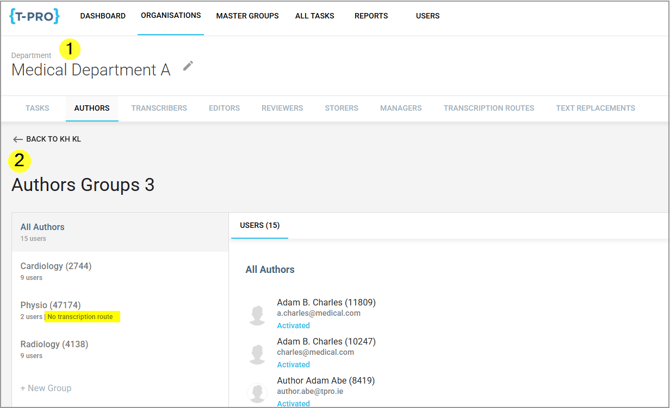
The rule is: One transcription route is needed per author group.
Above, the Physio group does not have a transcription route.
3 - To set one up move to the tab TRANSCRIPTION ROUTES.
There are two existing transcription routes.
4 - Click on + New Transcription Route.

The New Transcription Route window opens:
Give the new route a Name. This could be the name of the author group which should use this route.
Next, you need to select the Dictation group. This assigns the author group to this route. Select the relevant one from the dropdown list.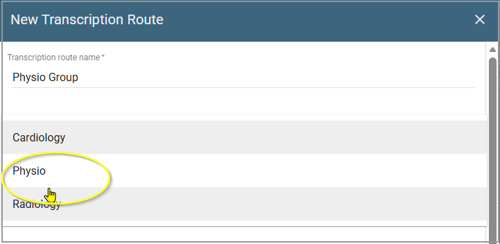
In the next steps you set up the workflow the new transcription route should follow.
You have the below options; scroll through them all:
Speech Recognition - this will get added if you have paid for this feature or T-Pro types your letters.
Transcription - select if you want to assign this route to a particular transcription group to process these letters.
Editing - is only relevant to T-Pro.
Review - this will need to be added if your letters are being typed by T-Pro. A percentage can be set, e.g. 25% of documents will automatically be sent to review.

Processing - again, if your letters are typed by T-Pro, this will allow the letters to go to admin staff prior after being typed, before going to the doctors for approval.
A percentage can be set here too, working as a second QA option.

Approval and Second Approval - offers the options Creator, Specific Person or Group. We recommend to select Creator for Approval and Specific Person for Second Approval.
Storing - this is the group of admin staff who will be printing/finalising the letters.
Click on SAVE.
=> This will create the new transcription route.

You can see the workflow for this route and that the authors group Physio is assigned to it.
If you have any more queries, please do not hesitate to contact our Helpdesk or support@tpro.io.
© 2020-2026