
Background
A free text recipient is saved as one block of text, so systems further down the line - such as an EPR or distribution integration - can't pick out a name, address or electronic ID from it.
The facility setting Disable Free Text Recipient Entry lets you stop this at the source, by removing the Add Free Text Recipient button and requiring recipients to be added in a structured way instead (through the address book, previous recipients or the individual fields).
Because some organisations still rely on free text entry for existing integrations, this is a facility setting rather than a change that applies to everyone.
NOTE: The setting behaves the same wherever recipients are added - on tasks in Dictate Web, and in documents in Scribe Web.
Turning the setting on
In the facility's SETTINGS section, go to the Advanced Settings.- Search for Disable Free Text Recipient Entry.
- Select it, and set the toggle to active.
- Click on UPDATE SETTINGS.
- Then click SAVE ALL CHANGES.

=> the Add Free Text Recipient button no longer appears for any user at your facility, in either Dictate Web or Scribe Web.
NOTE: The setting is off by default, so nothing changes for your organisation until you add it and switch it on.
What the user sees
Before the setting is active - when adding a recipient, the user has following options:
-
search the address book
-
choose from previous recipients
-
complete the individual recipient fields (name, site, electronic ID and address)
-
or click Add Free Text Recipient to enter the details as one block of text.
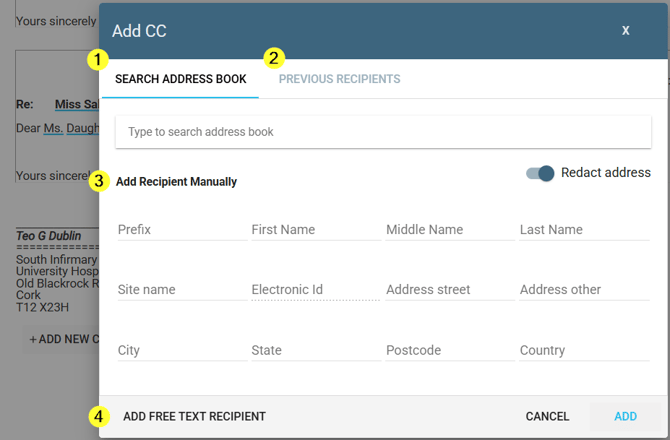
After the setting is active - the Add Free Text Recipient button is no longer shown. The user can still search the address book, choose from previous recipients, or complete the individual recipient fields; only the free text option is removed.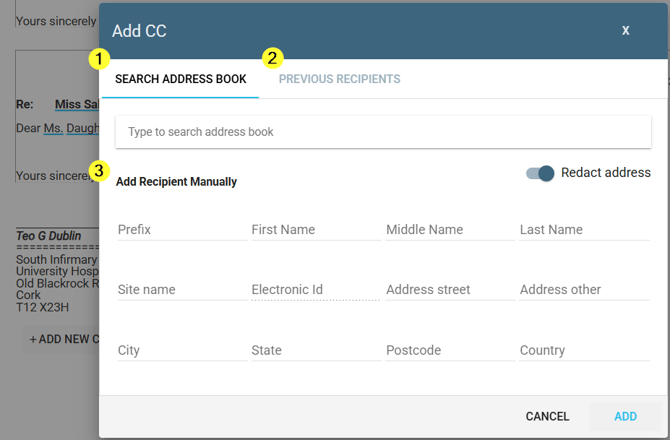
Things to know
- Search Address Book, Previous Recipients and the individual recipient fields all continue to work exactly as before - only the free text option is affected.
- In Scribe Web, if a document already has a free text recipient on it when the setting is switched on, that recipient is removed from the document the next time it's opened, as long as the document hasn't been approved yet. Already-approved documents keep their recipients unchanged.
- Once a task or document has been sent or approved, its recipients aren't affected by turning this setting on afterwards.
If you have any more queries, please do not hesitate to contact our Helpdesk or support@tpro.io.
© 2026