
As an author user you need to have speech recognition enabled to use the Dictionary.
- This dictionary is not about a term and its meaning but to improve the speech recognition output in case of more complicated words.
- The dictionary entries can be categorised to inform the application that a certain term is e.g. a location.
-
The dictionary entries are available across T-Pro's applications, e.g. they will also be available to you in Speech Direct.
Access the Dictionary via your account settings: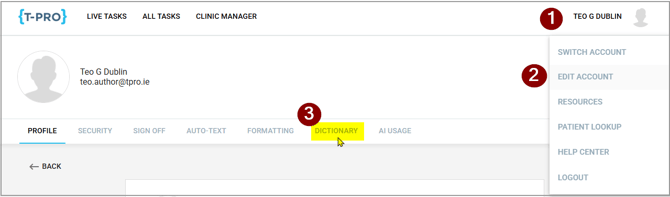
1 - Click on your user name
2 - Select EDIT ACCOUNT
3 - Click on DICTIONARY
=> A new tab opens.
Additional settings in relation to speech recognition can be accessed here too.
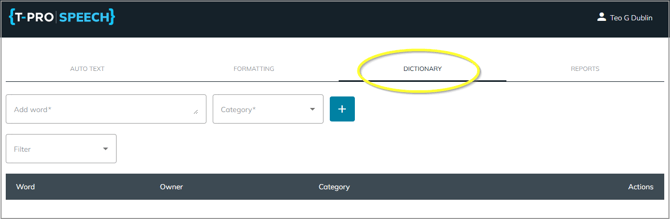
In the Dictionary section you can enter a word, set a category for this word, and add the entry to your dictionary.
Remember that the function of this dictionary is to produce correct spelling output for more complicated or unusual terms.
Example: Baker's cyst
If you want to achieve consistent output for the example term enter it in the required way.
Click into the Category field and select from:
People
Places
Medication
Procedure
Diagnosis
Other
Excluded (scroll down)

Click on the + symbol to save the entry.
=> It will be added to your term list.

The new entry is automatically active.
You as the Owner can delete or edit the entry.
Your organisation can also add terms on organisation level, so all users have the same entries.
Such entries cannot be deleted or modified by the end user but could be deactivated.
Category Excluded
Note that the Excluded category can be very important. If you find that a word is falsely recognised and you do not want this word to be used in transcribed text then add it to the Excluded category.
Example: Worcestershire
If the repeated output for this location is spelled for example "Worcester" or "Worcester share" add those false terms to your list to be excluded.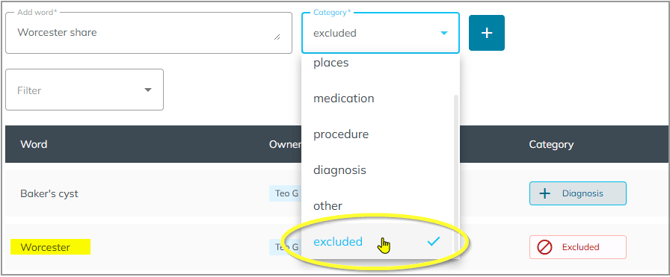
If you have any more queries, please do not hesitate to contact our Helpdesk or
support@tpro.io.
© 2026