
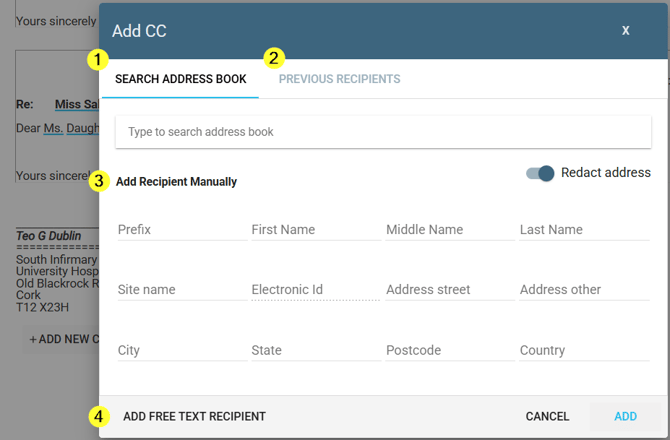
When adding a recipient to a task or document, there are normally four ways to do it:
-
search the address book
-
choose from previous recipients
-
complete the individual recipient fields (name, site, electronic ID and address)
-
or click Add Free Text Recipient to enter the details as one block of text.
Some organisations switch off that last option.
If your facility has done this, the Add Free Text Recipient button (previously labelled Add Manually) doesn't appear at all - it isn't greyed out or hidden away, it simply isn't there.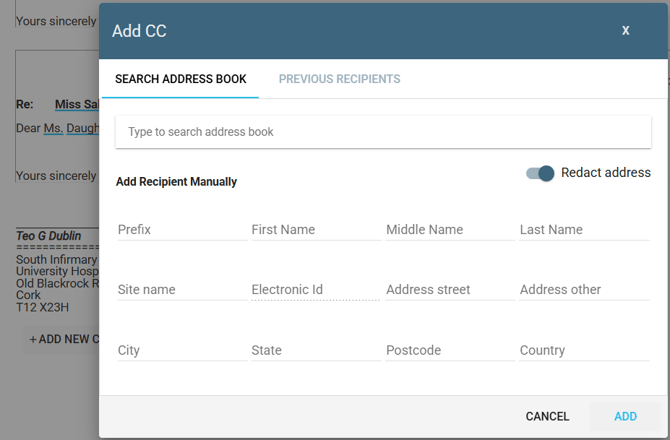
Why your organisation might do this
A free text recipient is saved as one block of text, so systems further down the line - such as an EPR or distribution integration - can't pick out a name, address or electronic ID from it. Completing the individual fields instead keeps the recipient in a format those systems can read, which avoids integration and data quality issues.
What to use instead
If you need to add recipient data manually use the fields (3 in the screen above) to enter the recipient's name, site, electronic ID and address in a structured way.
NOTE: This is controlled at facility level, not by individual users. If you think the free text option should be available, contact your administrator.
If you have any more queries, please do not hesitate to contact our Helpdesk or support@tpro.io.
© 2026