
Context notes let a clinician capture short, supporting information alongside a consultation, separate from the spoken transcript. Notes can be added or removed both during a live consultation and afterwards, while reviewing the generated documents, using the same note list and delete action in both places.
In the consultation screen
The context note input area has moved to the bottom of the screen.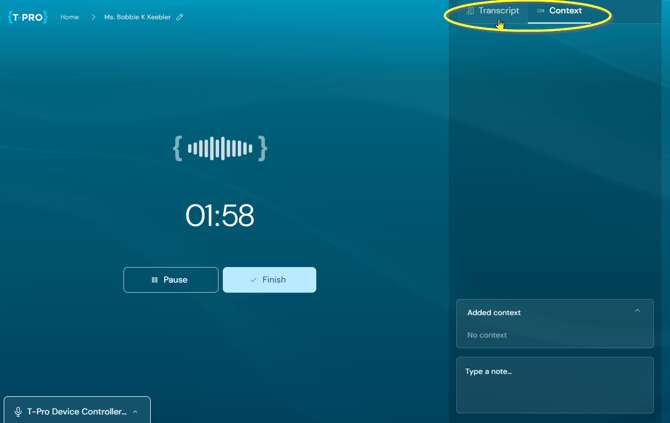
- The Save button has been removed; pressing Enter is enough to add a note.
- Notes are displayed in reverse chronological order, with the newest note at the bottom.
- The background shading alternates between notes, so consecutive notes are easier to tell apart.
In the document section
Previously, the Context tab in the document section was read-only: users could view the notes captured during the consultation but could not add, edit or remove them there. Updating context meant resuming the consultation.
Users can now add or delete context notes directly in the document section, the same way they already can during a recording.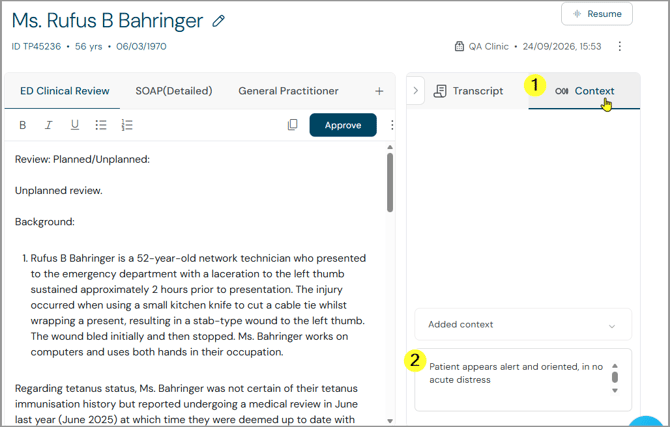
Adding or deleting a note in the document section marks the generated documents as "out of sync" with the latest context, the same way any other consultation change does.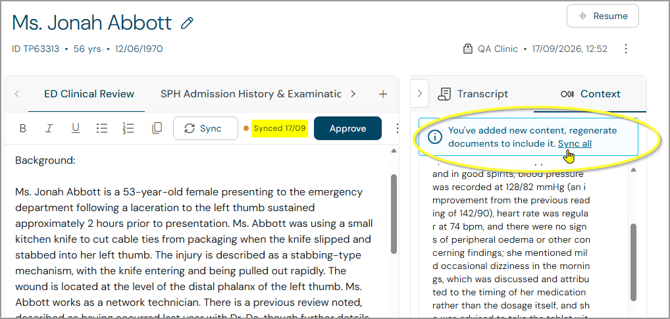
- The existing per-document out-of-sync indicator is shown on each affected document.
- The existing per-document "Sync now" action regenerates that document individually.
- When more than one document has been generated, a blue banner appears in the Context panel with a "Sync all" action, which triggers the existing bulk regeneration flow.
- Once all affected documents have been regenerated, the out-of-sync indicators and the banner clear. If only some documents are regenerated, the banner stays until the rest are synced too.
This reuses the existing out-of-sync and regeneration functionality; no separate synchronisation process was introduced for context notes.
New strings
Three new strings were added for this feature (confirmed English wording, with the German equivalent for reference):
| English | German |
|---|---|
| No content added | Kein Inhalt hinzugefügt |
| Sync all | Alle synchronisieren |
| You've added new content, regenerate documents to include it. | Sie haben neue Inhalte hinzugefügt. Erstellen Sie die Dokumente neu, um diese einzubinden. |
"No content added" is the empty-state message shown when the Context panel has no notes yet. "Sync all" and the banner message appear together once context has changed since the documents were last generated.
Release
This shipped in Scribe Web 2.3.1 (TDP-3078), released 24 September 2026.
© 2026