
Introduction
Smart Transcription removes the typist step from the Dictate workflow. The clinician dictates exactly as before, with no dictation commands. The AI produces the finished, formatted document, flags anything it's unsure of for a reviewer to check, and pulls out any dictated instructions (book a follow-up, request a test, CC someone) as tasks for admin.
Nothing bypasses the clinician — every document still goes to them for final approval.
NOTE: It is switched off by default, and is enabled at department level by changing the department's transcription route, so the whole department moves over at the same time.
Why it exists
Benefits
How it works
The Quality Assurance queue
Enabling the setting for users
Common questions
Sales specific details
Why it exists
Hospitals that still rely on dictation can't benefit from AI without moving every clinician to a different way of working — ambient capture or a speech-driven template — and that change can stall for months.
Smart Transcription is a distinct option alongside Smart Dictation and AVT, not a stepping stone to either: it's for clinicians who dictate today and aren't moving to ambient capture, and for clearing a backlog that ambient capture alone doesn't touch.
Benefits
- Enabled in about 10 minutes per department — no install, no new app.
- No change management: clinicians keep their usual templates, with no dictation commands to learn.
- Faster turnaround: documents that don't need review go back to the clinician within seconds.
- Gives the benefit of AI to clinicians who won't move to Scribe or ambient capture.
How it works
- The clinician records as usual, in their usual document template — no dictation commands needed.
- The AI transcribes, formats, and places the dictation into the template body. It no longer goes to a typist.
- The AI flags anything it's unsure of (an unclear word, a recipient mismatch) and separately pulls out any instructions as admin tasks.
- Nothing to flag: the document goes to the clinician for approval, usually within seconds — unless it's picked up by the quality check sample.
- Something to flag: the AI adds a note to the task and sends it to the Quality Assurance queue. Flagged tasks always go to QA, regardless of the quality check percentage.
- A reviewer actions the note or instruction and moves the task on for approval.
- The clinician reviews and approves, as they do today.
The Quality Assurance queue
Tasks flagged by the AI are listed under QUALITY ASSURANCE on the Dictate web portal's Tasks page until a reviewer actions them.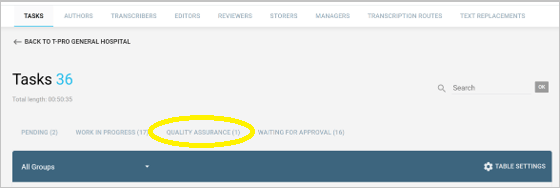
On top of the AI's own flags, a configurable quality check also sends an agreed percentage of unflagged documents to QA — adjustable later, and often set higher early on to help build confidence.
The AI's note: in the task's Notes tab, under Comments, starting "AI: Check:" and explaining what it heard and why it flagged it. A shortened version also shows in the task list, so reviewers can see why before opening it.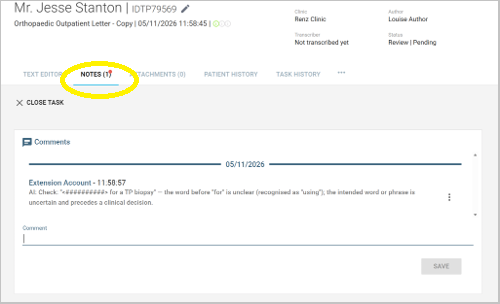
In the document: the AI leaves a placeholder (<##########>) at the exact point it was unsure of, rather than guessing. The reviewer listens back from the player at the bottom of the editor, replaces the placeholder, and saves — the rest of the document is already done.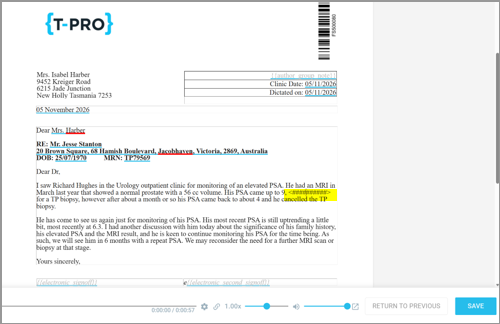
Enabling the setting for users
Enable Smart Transcription by changing the department's transcription route (Transcription routes tab) in the Dictate web portal.
Before go-live, agree with the customer:
- which departments move over, and a go-live date for each;
- the quality check percentage per department;
- who manages the Quality Assurance queue — often the existing typing or admin team.
Common questions
Is this just speech recognition? No — speech recognition gives a clinician text they still have to fix. This gives the finished letter, the instructions as tasks, and a flag on anything a transcriber would have queried.
Who's accountable if the AI gets something wrong? The clinician, as today. Flagged documents are checked by a reviewer first.
Does this replace Scribe or AVT? No — it's for clinicians who aren't moving to ambient capture, and for clearing a backlog that ambient capture doesn't touch.
Does it replace the typing or admin team? No. It changes what they do, not whether they're needed. Avoid "fully automated" or "no human needed" — a human stays in the loop for anything flagged, and for approval.
Sales specific details
|
Setting |
Fit |
What to lead with |
Watch out for |
|
Outpatients |
Lead |
Switched on overnight, no clinician change management, backlogs cleared in days. Core use case. |
Accounts mid-way through an AVT rollout: position alongside, never as a step back. |
|
Community (paediatrics, therapies, child development) |
Strong |
Letter heavy and dictation led; actions for admin in every letter. Often the same trust contract as outpatients. |
Community EPRs (Rio, SystmOne) and their document return routes. |
|
Mental health |
Strong |
Long narrative letters to multiple recipients. The recipient mismatch flag matters for confidentiality and safeguarding. |
Longer letters mean more QA flags per file at first; set expectations on the review rate. |
|
Legal and business |
Strong |
Dictation is still the default. Diarise, send and invoice instructions mirror what a secretary does. |
QA rules and the flag set are clinical today. [TBC: legal QA rules] |
|
Private practice and private hospital groups |
Strong |
Secretarial cost sits on the P&L, so the saving is visible and the decision is faster. |
Smaller volumes per site; sell at group level. |
|
Inpatients |
Selective |
Only where discharge summaries and ward letters are still dictated. Otherwise sell Scribe or AVT. |
Most discharge documentation has moved into the EPR. |
|
Primary care |
Selective |
Referral letters in Ireland, Australia and New Zealand. Sell through PMS partners, not direct. |
England primary care is template driven; little dictation to replace. |
|
Radiology, ED, nursing, ambulance, social care |
Do not pitch |
No dictation workflow to replace. The value there comes from Scribe. |
Radiology already runs front-end speech with structured templates. |
Table 1. Product fit by setting, T-Pro corporate strategy working view, November 2026.
Do not refer to as:
-
Fully automated
-
no human needed
-
replaces the secretary
=> Admin teams are the buyer's operational backbone and the product gives them routed work, not redundancy.
© 2026