
What is not available offline
Dictation. Dictation cannot be started while the device is offline. If the clinician selects Start a dictation, they are told that Dictation is unavailable offline and are offered the option to start a Consultation instead. Offline Mode currently covers Consultation only.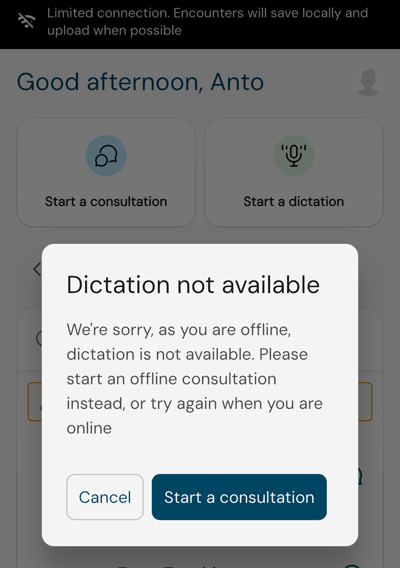
Full patient search. The clinician cannot search the full patient database while offline. Patients may still be selected from the locally cached schedule, if one is available, or entered manually.
Document generation and preview. Documents for a newly completed offline consultation are not generated until the encounter has uploaded and can be processed online. The clinician can choose which templates they want beforehand, but the documents themselves are produced later.
Product boundaries to avoid promising
When talking to customers, Sales and Support should avoid implying that any of the following are possible: offline Dictation, full offline patient or database search, live schedule updates while disconnected, offline document generation, offline preview of newly recorded encounters, immediate availability of locally stored encounters on desktop or web, or uploads happening while the mobile app itself cannot run or reconnect.
Common customer questions
"Can I use Scribe with no internet at all?" The clinician can use the core mobile Consultation workflow offline, provided they were already able to access the app. Some connected features, including Dictation, full patient search, document generation and document preview, stay unavailable until the connection returns.
"Will I lose my recording if the Wi-Fi drops?" No. Recording continues, and any part of the consultation that cannot be uploaded straight away is kept locally until it can be.
"Can I record several patients while offline?" Yes. The clinician can finish one encounter, save it locally, and start another straight away without waiting for the first to upload.
"Where are my recordings while I'm offline?" They are stored securely on the mobile device and listed in the Encounters saved locally section.
"Can I see them on my computer?" Not until they have uploaded and finished processing.
"Will my documents be created while I'm offline?" No. The clinician can choose the templates they want while offline, but the documents are generated once the encounter has uploaded and can be processed online.
"Can I use Dictation offline?" No. Offline Mode currently supports Consultation only.
"Can I find any patient while offline?" No, full patient search needs a connection. Patients from the locally available schedule can still be selected, and patient details can also be entered manually.
"Do I have to upload every encounter myself?" No. There is no manual file transfer. Once the connection returns, the clinician just needs to open the mobile app so the locally stored encounters can begin uploading; progress is shown on the Encounters screen.
- Offline Mode in Scribe Mobile: Overview
- Offline Mode in Scribe Mobile: Recording a Consultation
- Offline Mode in Scribe Mobile: Uploading and Returning Online
© 2026