
T-Pro Scribe lets users personalise how their generated documents are written and presented, without changing the clinical content of those documents.
What style settings control
Style settings only affect the presentation and level of detail of information that already exists in the consultation, including notes.
They govern the following:
-
how much detail is retained,
-
whether the document reads as prose or as structured lists,
-
how abbreviations and direct quotations are used,
-
how the clinician and patient are referred to.
Style settings must never introduce, strengthen or infer clinical information that the source content does not support.
Two ways to apply style settings
- Default style settings – persistent, user-level preferences that apply to every new document a user generates.
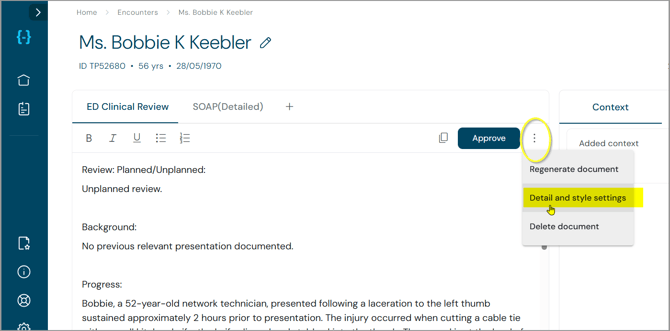
Available under Settings - Document-level style settings – override current settings with new ones for one individual document only.
Available under Encounters in the document section
A document-level change never changes the user's saved defaults. See Scribe Style Settings: Changing Settings for an Individual Document for how this works.
Where default settings are managed
Default style settings are set under:
1- Settings → 2 -Blueprints & styles → 3 - scroll further down → Default style settings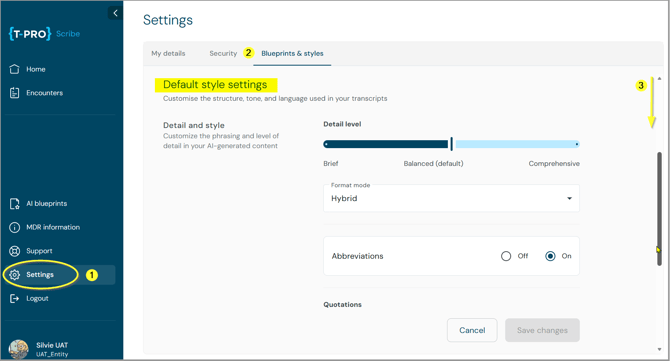
Screen 1
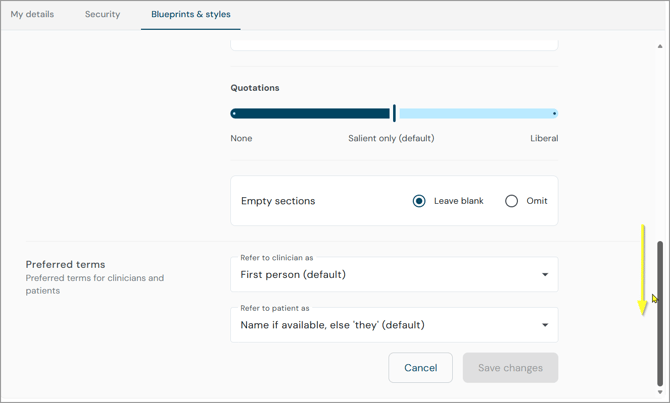
Screen 2
- These are persistent, user-level preferences.
- Save changes must be selected before an update takes effect.
- Save changes stays disabled until a change is made.
- Once saved, the new settings apply to every new document Scribe generates from that point on.
Context information:
The same screen also holds the user's default blueprint types (previously Default document types).
Up to three are shown by default; View more expands the full list.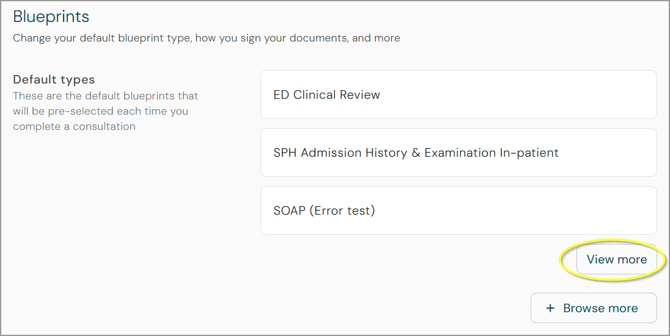
-
This is the same on web and mobile.
Blueprint instructions always come first
Blueprint instructions take precedence over style settings.
- If a blueprint asks for specific content or gives section-level instructions, Scribe follows the blueprint, not the style preference.
- Style settings only personalise presentation within what the blueprint requires; they never add or remove content the blueprint asks for.
See Scribe Style Settings: Blueprint Precedence, Clinical Safety and Support Guidance for more detail.
Key messages for Sales, Customer Success and Support
- Users can personalise the style of their Scribe documents without changing the underlying clinical meaning.
- Users can set persistent defaults and still tailor an individual document.
- New documents always use the latest saved user defaults.
- Existing documents can be regenerated using updated preferences, but changing the defaults does not automatically update documents that already exist.
- Blueprints still control what information is required, and style settings never give Scribe permission to invent clinical content or reasoning.
- Scribe Style Settings: The Default Style Options Explained
- Scribe Style Settings: Changing Settings for an Individual Document
- Scribe Style Settings: Blueprint Precedence, Clinical Safety and Support Guidance
© 2026