
In addition to setting persistent defaults, a user can change selected style settings for a specific, already-generated document.
This article explains where that is done, what can be changed, and how document-level settings interact with the user's defaults.
Changes made in a document as described below do not modify the user's Default style settings.
Where document-level settings are accessed
- Go to Encounters
Select the relevant entry - Click on the three-dot menu
- Select Detail and style settings.

- When this document originally had been generated, Scribe retrieved the latest saved Default style settings.
What can be changed at document level
Only four of the seven style settings are available at document level.
The screen will display your default settings.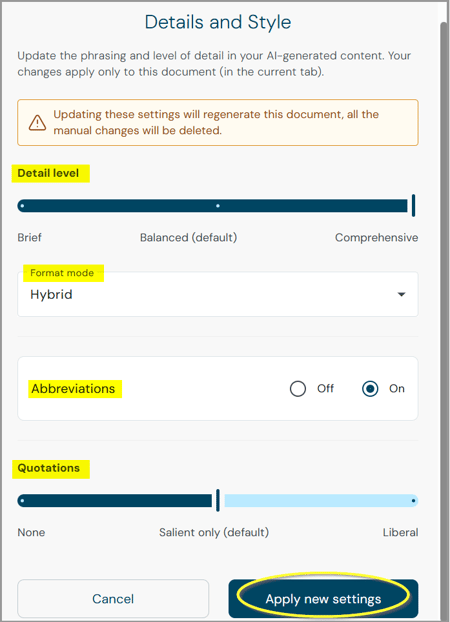
The more advanced default-only preferences, such as Refer to clinician as, Refer to patient as, and Empty sections, are not available at document level.
- Selecting Apply new settings regenerates the current document with the values shown. Only that document is regenerated; other documents in the same encounter are not affected.
- Document-level settings applied to one document are never inherited by a newly generated document.
NOTE: Once document-level settings have been applied and the document regenerated, those values become the active configuration. Reopening Detail & Style then shows the most recently applied document-level settings.
Manual edits may be overwritten
Applying new style settings requires the document to be regenerated, so any manual edits already made to that document may be replaced by the regenerated content.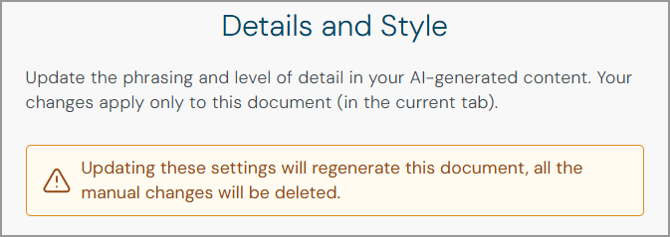
The user is warned about this before applying the settings.
Support teams should keep this in mind when helping a user who has manually edited a document before asking about style settings.
Settings hierarchy at a glance
| Situation | Style settings used |
|---|---|
| Generate a new document | Latest saved user Default style settings |
| Open Detail & Style for a document with no previous document override | Current user defaults |
| Apply different settings to that document | Selected document-level settings |
| Reopen Detail & Style after successful document-level regeneration | Most recently applied document-level settings |
| Generate another new document | Latest user defaults, not another document's settings |
A document-specific override never changes the user's overall defaults, and changing the user's defaults never overwrites a document-specific configuration that has already been applied.
Related articles
- Scribe Style Settings: Overview
- Scribe Style Settings: The Default Style Options Explained
- Scribe Style Settings: Blueprint Precedence, Clinical Safety and Support Guidance
© 2026