
Scribe has seven default style settings that a user can configure under Settings → Blueprints & styles → Default style settings.
Each setting is described below, together with its available options and default value.
Detail level
Detail level is the primary style control. It governs how much the generated document compresses the information captured during the encounter, but it never changes what a blueprint explicitly requires: if a blueprint placeholder asks for particular information, Scribe includes it regardless of the selected Detail level.
The options are Brief, Balanced (default) and Comprehensive.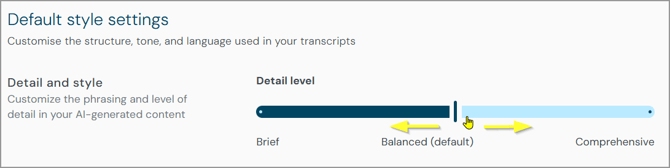
Use the slider to change the detail level.
- Brief is designed for higher-volume or lower-complexity encounters where a concise note is preferred. The output focuses on findings, decisions and plans, and supporting context, such as symptom duration, minor negative findings or examination technique, may be omitted. Information the blueprint explicitly requires is still retained.
- Balanced is designed for routine clinical documentation. Scribe retains all clinically important information, such as the presenting complaint, relevant positive and negative findings, diagnoses and plans as stated, medications and doses, and safety-netting. Less important conversational content, such as back-and-forth, repetition, hedging and exact patient wording that is not clinically significant, is compressed into concise clinical wording. Scribe does not add explanatory links between facts or describe the clinician's reasoning unless that reasoning was actually stated.
- Comprehensive is designed for situations where preserving everything said is important, such as medico-legal, safeguarding, audit or teaching scenarios. Scribe retains full clinical context, supporting detail, conversational context and patient wording that would normally be compressed elsewhere, and content is not intentionally compressed or summarised.
Format mode
Format mode controls how information is presented within the document, within the structure the blueprint defines.
The options are Structured, Hybrid (default) and Prose.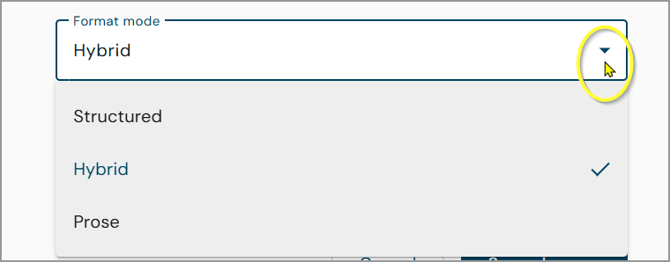
- Structured uses primarily lists, bullets and short structured entries, while still respecting the underlying blueprint structure.
- Hybrid lets Scribe choose between prose and structured content depending on the section; for example, examination findings may be presented as concise structured information while history or discussion is written in prose.
- Prose uses continuous narrative wording throughout the document, where the blueprint allows it.
Abbreviations
Abbreviations controls whether standard, permitted clinical abbreviations are used.
It has an On/Off setting.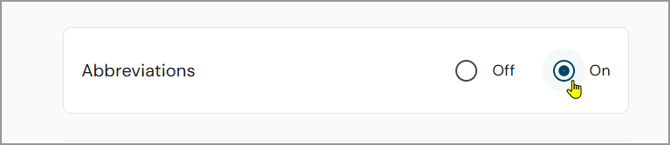
- Off - Clinical terms are generally written in full and abbreviations are used rarely.
- On (default) - Standard abbreviations are used for commonly abbreviated clinical terms. This still operates within Scribe's abbreviation safety rules, so turning Abbreviations on does not permit unsafe or prohibited abbreviations.
Quotations
Quotations controls whether direct patient wording is retained as quotations.
The options are None, Salient only (default) and Liberal.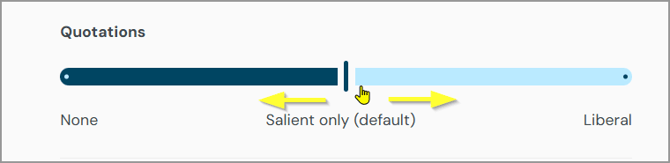
- None means no direct patient quotations are used.
- Salient only uses a direct quote only when the patient's exact words carry clinical significance.
- Liberal allows patient wording to be quoted more freely, where it contributes useful clinical meaning.
Empty sections
Empty sections controls what happens when a blueprint section has no relevant content, but only where the blueprint itself does not already contain an explicit instruction about whether that section should be included or omitted; a blueprint-specific instruction always takes precedence.
The options are Leave blank and Omit (default).
- Leave blank keeps the section heading but leaves the content empty.
- Omit removes the empty section and its heading from the generated document.
Refer to clinician
This setting controls the voice used when referring to the clinician.
The options are First person, Passive, Third person, and Hybrid (default).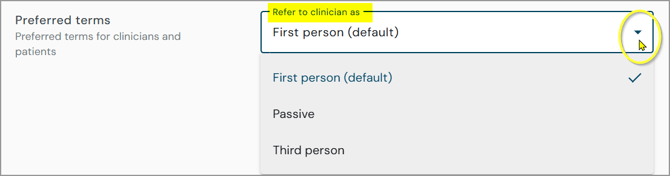
- First person uses first-person phrasing throughout, for example: "I examined the abdomen and discussed the findings with the patient."
- Passive uses subject-less, action-focused language throughout, for example: "The abdomen was examined."
- Third person refers to the clinician by name, for example: "Dr Smith examined the abdomen."
- Hybrid varies the voice by content type: structured or list-based content uses concise passive or subject-less wording, for example "Chest clear. Abdomen soft, non-tender," while narrative content uses first-person prose, for example "I discussed the results with the patient and advised follow-up if symptoms persist." The same structured-versus-prose distinction used for Format mode determines which voice applies.
Refer to patient
This setting controls how the patient is referred to in generated documents.
The options are Name if available, else 'they' (default), Name only, and They.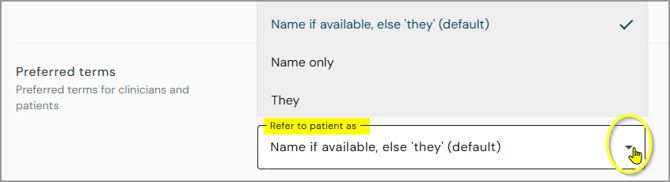
- Name if available, else 'they' uses the patient's name where it is available, and they/them where it is not available or not suitable in context.
- Name only always refers to the patient by name and does not use pronouns.
- They always uses they/them. Scribe must not infer gendered pronouns.
Related articles
- Scribe Style Settings: Overview
- Scribe Style Settings: Changing Settings for an Individual Document
- Scribe Style Settings: Blueprint Precedence, Clinical Safety and Support Guidance
© 2026